


We are currently preparing Domain Summit Africa 2027, which will take place in Diani, Kenya, this coming January.
As the event organizer, I have quite a few things to keep track of: speakers, sponsors, ccTLD partners, hotel arrangements, suppliers, marketing, registration, and all the small things that nobody notices when they go right
I wanted a simple way to organize all this without introducing another expensive subscription or spending more time managing project management software than actually organizing the event.
So, this October I am giving kanboard.org a proper try.
Why Kanboard?
1. Well, it was highly advised to me by ChatGPT (when I did the "deep research")
Next (no need to make points 2, 3 and so on), I like simple, practical software. Kanboard is open-source, self-hosted, lightweight, and doesn't try to do a hundred things at once.
Also, I own HostMaria, so I can host Kanboard myself on our shared Cloud infrastructure.
For comparison, the same shared Cloud hosting plan would cost our clients just $24.50 per YEAR.
That's quite a difference compared to paying monthly subscriptions for some of the popular project management platforms, especially when you have a small team.
And, of course, I like having control over our own data.
1. Setting up the workflow
My first version of the board was very basic. However, after thinking about how we actually work when organizing events, I changed it to six columns:
1. Backlog - Ideas and requests
2. To Do - Approved and ready
3. In Progress - Work underway
4. Waiting - External response
5. Review - Approval or checking
6. Done
The "Waiting" column is particularly useful.
When organizing an international conference, a surprisingly large part of the work involves waiting for somebody else. Waiting for a hotel manager, a speaker, a supplier's quotation, a sponsor, or an organization to confirm something.
I don't want those tasks sitting in "In Progress" when there's nothing we can actually do until somebody replies.
Here is how our board currently looks:
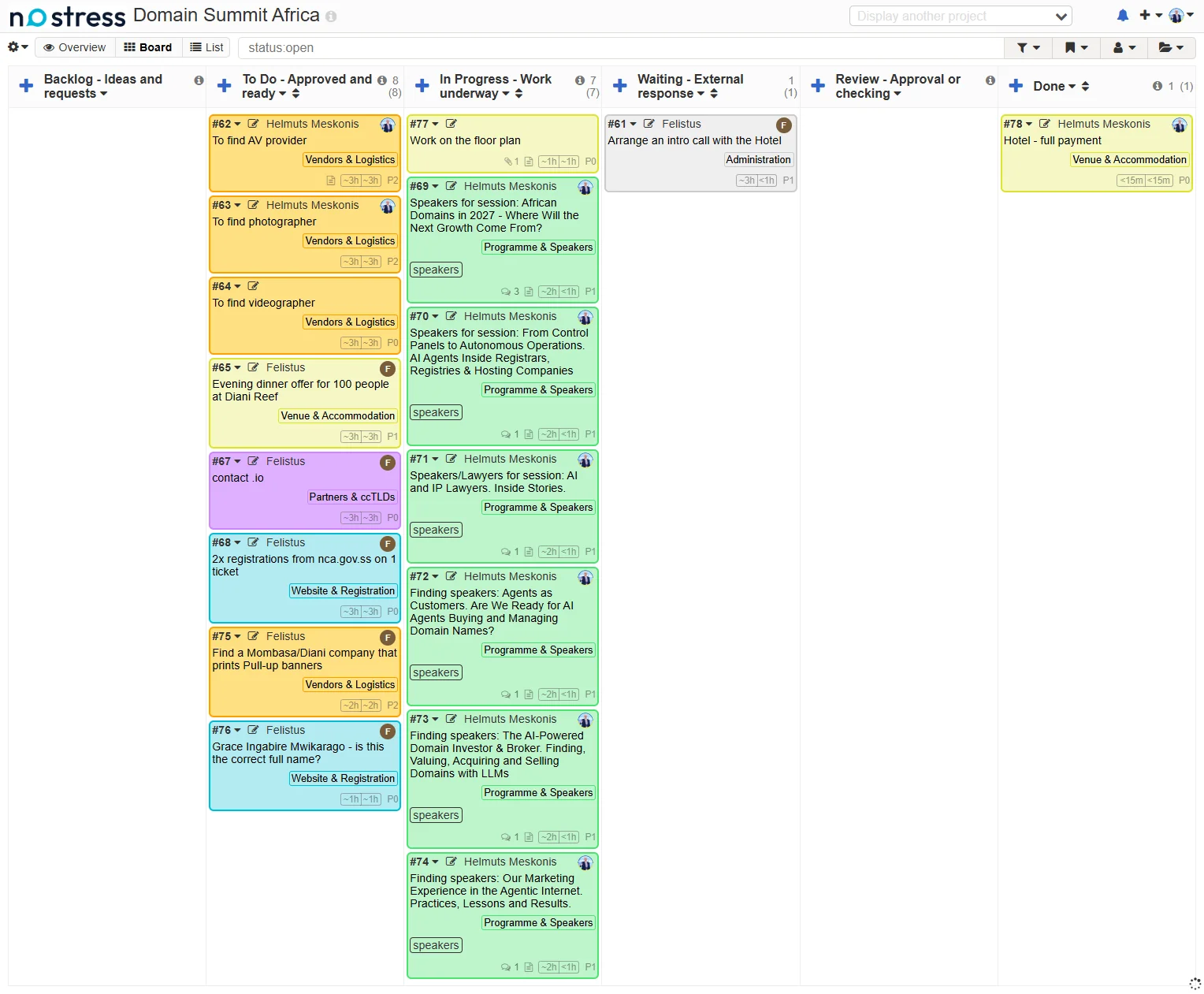
[The main Kanboard showing our six workflow columns, with real tasks for speaker recruitment, AV suppliers, photography, videography, hotel arrangements, ccTLD outreach, and other conference preparations. Tasks are assigned to team members, and the colors identify different areas of work.]
It's still early days, and I have many more tasks to add. But I already find it useful to see everything in one place.
2. Organizing tasks into categories
The next thing I worked on was categories.
Instead of having one long list of unrelated tasks, I've created categories covering different parts of event organization.
These include:
- Venue & Accommodation
- Programme & Speakers
- Partners & ccTLDs
- Sponsors & Exhibitors
- Government & VIPs
- Delegates & Hospitality
- AV & Event Production
- Vendors & Logistics
- Onsite Operations
- Marketing & PR
- Social Media
- Website & Registration
- Finance & Contracts
- Administration
I've also kept separate categories for Development, Bug / Technical, and Moderation.
Why Development?
Because we are planning to develop our own event registration platform and app. We currently use Eventzilla, and I'm not sure whether our own platform will be ready before the January event, but it's something we're working towards.
The Bug / Technical category is useful for keeping track of issues I occasionally discover in Eventzilla and report to their support team.
3. Making the board colorful (but with some logic)
I spent a little time playing with category colors.
I wanted to be able to glance at the board and immediately recognize what kind of work is being done, without having to read every task.
So I grouped related activities into color families.
For example:
- Greens for speakers, programme, delegates, and people-related activities.
- Yellows and oranges for venues, suppliers, and physical event production.
- Purples and pinks for partnerships and sponsors.
- Blues and teal for websites, marketing, and development.
- Red for technical bugs.
- Grey for general administration.
Here are the categories and colors I've chosen:
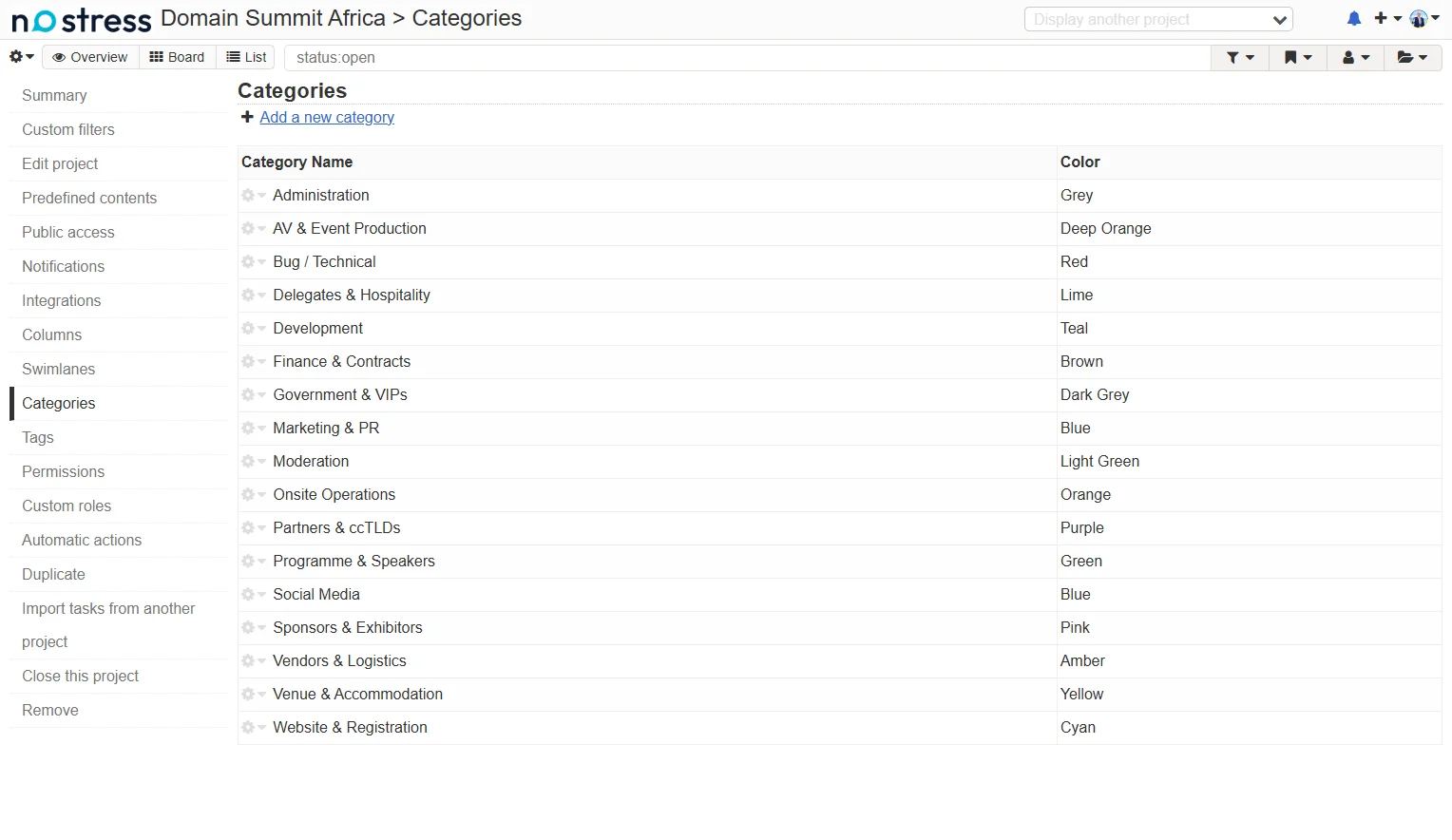
[Kanboard's category configuration showing all 17 event-management categories and their assigned colors. Related activities use similar shades, making the board easier to understand visually.]
It may seem like a small detail, but I really like the result. A board with dozens of tasks becomes much easier to scan when the colors actually mean something.
4. Automating the boring stuff
One feature I particularly like about Kanboard is its built-in automatic actions.
I've configured it to automatically assign the correct task color based on the category.
For example, when I create a task under "Programme & Speakers", it automatically becomes green. Vendor-related tasks become amber, partnership tasks purple, and so on.
No need to select colors manually every time.
I've also added automatic comment logs when tasks are moved into certain workflow columns. This gives us a simple record of how tasks progress.
Here is what the automatic actions configuration looks like:
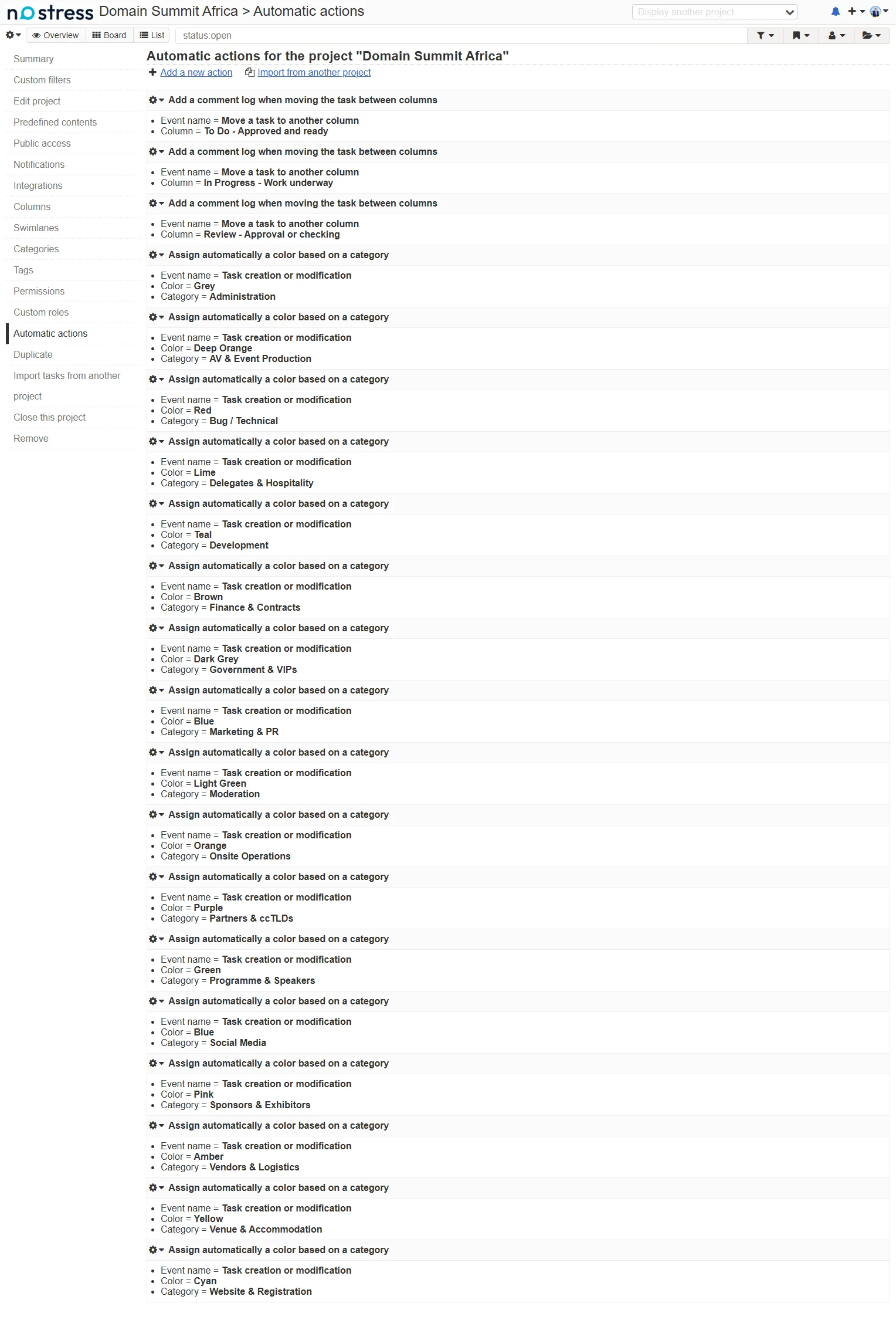
[Kanboard's Automatic Actions settings. The screenshot shows the rules that assign card colors according to their categories, along with rules that add comment logs when tasks move between selected workflow stages.]
Nothing particularly sophisticated, but that is exactly what I wanted. A few small automations that save time and help keep things consistent.
5. Working with a small team and external partners
At the moment, the board is mainly for coordinating our internal organizational work.
Tasks have assigned owners, and I can quickly see what I'm working on and what has been delegated.
We are also working with industry partners, including KeNIC, one of our ccTLD partners and co-organizers.
Eventually, I may create a separate Kanboard project where some of our partners can participate directly in the preparations.
I think this would be useful for coordinating things such as local industry outreach, government invitations, speakers, and joint promotional activities.
I would rather give partners access to the specific areas where we're collaborating than share all our internal financial and supplier arrangements.
6. Still a work in progress
I'm definitely not claiming that I have created the perfect event management system
There are still plenty of things to improve.
For example, I need to become more disciplined about adding deadlines, breaking bigger jobs into smaller deliverables, and tracking which tasks are genuinely blocking other work.
We will also need a much more detailed production schedule as the event gets closer.
But for now, I like the direction this is going.
I can keep the system simple, host it myself, give tasks to team members, follow progress, and hopefully avoid losing important things somewhere between emails, WhatsApp messages, and my own notes.
And because I'm not paying per user, adding another team member isn't another monthly software bill.
.. and, a question for other event organizers (as I am super curious how others manage their event preparations): Do you use Trello, Asana, Monday, ClickUp, Kanboard, spreadsheets, or something you've built yourself?
And if you've used Kanboard for organizing conferences or other events, I'd be particularly interested to hear about any useful plugins, automatic actions, or workflows you've discovered.
I'll probably share another update as our Domain Summit Africa 2027 preparations progress.
Always happy to learn from fellow event organizers!
Helmuts
As the event organizer, I have quite a few things to keep track of: speakers, sponsors, ccTLD partners, hotel arrangements, suppliers, marketing, registration, and all the small things that nobody notices when they go right
I wanted a simple way to organize all this without introducing another expensive subscription or spending more time managing project management software than actually organizing the event.
So, this October I am giving kanboard.org a proper try.
Why Kanboard?
1. Well, it was highly advised to me by ChatGPT (when I did the "deep research")
Next (no need to make points 2, 3 and so on), I like simple, practical software. Kanboard is open-source, self-hosted, lightweight, and doesn't try to do a hundred things at once.
Also, I own HostMaria, so I can host Kanboard myself on our shared Cloud infrastructure.
For comparison, the same shared Cloud hosting plan would cost our clients just $24.50 per YEAR.
That's quite a difference compared to paying monthly subscriptions for some of the popular project management platforms, especially when you have a small team.
And, of course, I like having control over our own data.
1. Setting up the workflow
My first version of the board was very basic. However, after thinking about how we actually work when organizing events, I changed it to six columns:
1. Backlog - Ideas and requests
2. To Do - Approved and ready
3. In Progress - Work underway
4. Waiting - External response
5. Review - Approval or checking
6. Done
The "Waiting" column is particularly useful.
When organizing an international conference, a surprisingly large part of the work involves waiting for somebody else. Waiting for a hotel manager, a speaker, a supplier's quotation, a sponsor, or an organization to confirm something.
I don't want those tasks sitting in "In Progress" when there's nothing we can actually do until somebody replies.
Here is how our board currently looks:
[The main Kanboard showing our six workflow columns, with real tasks for speaker recruitment, AV suppliers, photography, videography, hotel arrangements, ccTLD outreach, and other conference preparations. Tasks are assigned to team members, and the colors identify different areas of work.]
It's still early days, and I have many more tasks to add. But I already find it useful to see everything in one place.
2. Organizing tasks into categories
The next thing I worked on was categories.
Instead of having one long list of unrelated tasks, I've created categories covering different parts of event organization.
These include:
- Venue & Accommodation
- Programme & Speakers
- Partners & ccTLDs
- Sponsors & Exhibitors
- Government & VIPs
- Delegates & Hospitality
- AV & Event Production
- Vendors & Logistics
- Onsite Operations
- Marketing & PR
- Social Media
- Website & Registration
- Finance & Contracts
- Administration
I've also kept separate categories for Development, Bug / Technical, and Moderation.
Why Development?
Because we are planning to develop our own event registration platform and app. We currently use Eventzilla, and I'm not sure whether our own platform will be ready before the January event, but it's something we're working towards.
The Bug / Technical category is useful for keeping track of issues I occasionally discover in Eventzilla and report to their support team.
3. Making the board colorful (but with some logic)
I spent a little time playing with category colors.
I wanted to be able to glance at the board and immediately recognize what kind of work is being done, without having to read every task.
So I grouped related activities into color families.
For example:
- Greens for speakers, programme, delegates, and people-related activities.
- Yellows and oranges for venues, suppliers, and physical event production.
- Purples and pinks for partnerships and sponsors.
- Blues and teal for websites, marketing, and development.
- Red for technical bugs.
- Grey for general administration.
Here are the categories and colors I've chosen:
[Kanboard's category configuration showing all 17 event-management categories and their assigned colors. Related activities use similar shades, making the board easier to understand visually.]
It may seem like a small detail, but I really like the result. A board with dozens of tasks becomes much easier to scan when the colors actually mean something.
4. Automating the boring stuff
One feature I particularly like about Kanboard is its built-in automatic actions.
I've configured it to automatically assign the correct task color based on the category.
For example, when I create a task under "Programme & Speakers", it automatically becomes green. Vendor-related tasks become amber, partnership tasks purple, and so on.
No need to select colors manually every time.
I've also added automatic comment logs when tasks are moved into certain workflow columns. This gives us a simple record of how tasks progress.
Here is what the automatic actions configuration looks like:
[Kanboard's Automatic Actions settings. The screenshot shows the rules that assign card colors according to their categories, along with rules that add comment logs when tasks move between selected workflow stages.]
Nothing particularly sophisticated, but that is exactly what I wanted. A few small automations that save time and help keep things consistent.
5. Working with a small team and external partners
At the moment, the board is mainly for coordinating our internal organizational work.
Tasks have assigned owners, and I can quickly see what I'm working on and what has been delegated.
We are also working with industry partners, including KeNIC, one of our ccTLD partners and co-organizers.
Eventually, I may create a separate Kanboard project where some of our partners can participate directly in the preparations.
I think this would be useful for coordinating things such as local industry outreach, government invitations, speakers, and joint promotional activities.
I would rather give partners access to the specific areas where we're collaborating than share all our internal financial and supplier arrangements.
6. Still a work in progress
I'm definitely not claiming that I have created the perfect event management system
There are still plenty of things to improve.
For example, I need to become more disciplined about adding deadlines, breaking bigger jobs into smaller deliverables, and tracking which tasks are genuinely blocking other work.
We will also need a much more detailed production schedule as the event gets closer.
But for now, I like the direction this is going.
I can keep the system simple, host it myself, give tasks to team members, follow progress, and hopefully avoid losing important things somewhere between emails, WhatsApp messages, and my own notes.
And because I'm not paying per user, adding another team member isn't another monthly software bill.
.. and, a question for other event organizers (as I am super curious how others manage their event preparations): Do you use Trello, Asana, Monday, ClickUp, Kanboard, spreadsheets, or something you've built yourself?
And if you've used Kanboard for organizing conferences or other events, I'd be particularly interested to hear about any useful plugins, automatic actions, or workflows you've discovered.
I'll probably share another update as our Domain Summit Africa 2027 preparations progress.
Always happy to learn from fellow event organizers!
Helmuts
